

Best 10 Text to Image Prompt Ideas for Men’s Custom Visual Content Creation
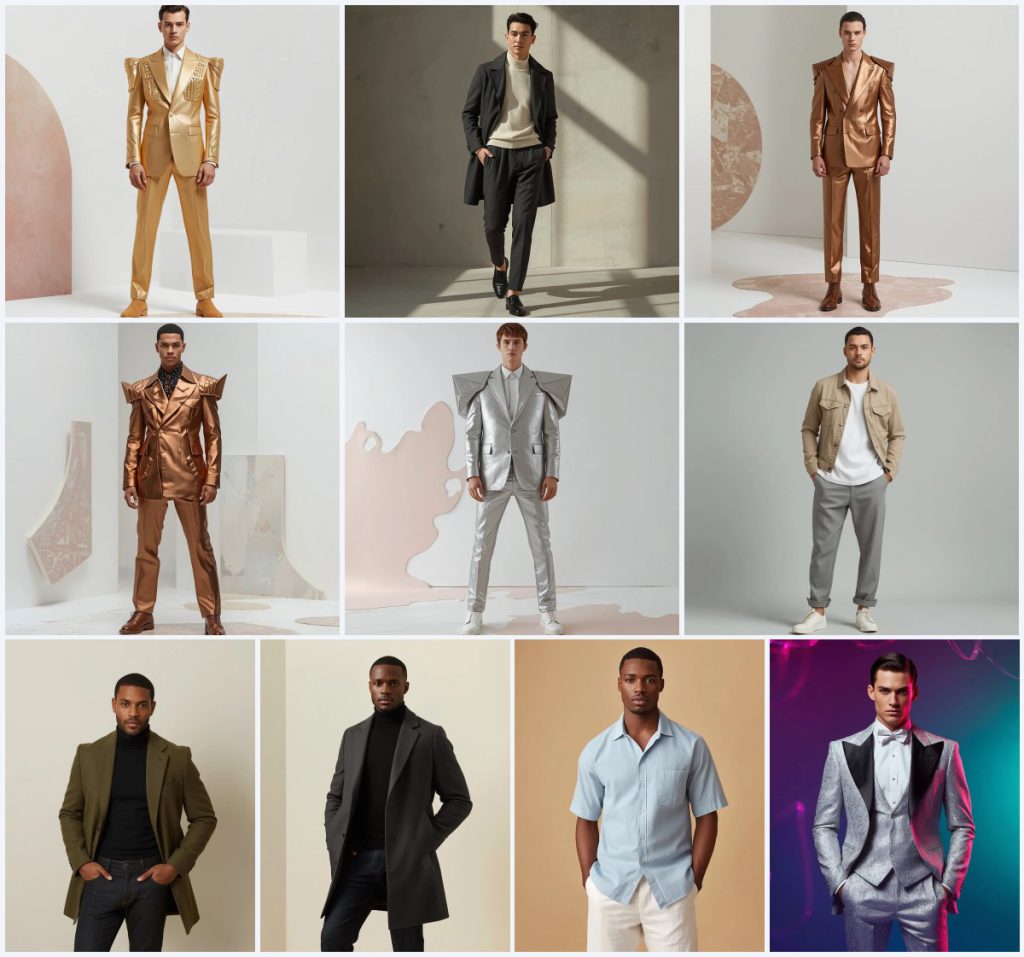
This collection brings together ten striking text-to-image prompts designed for men’s custom visual content creation. Each prompt focuses on a distinct look, from avant-garde metallic blazers with 3D embossing to refined casual influencer outfits, all captured in high-end editorial style. The shared goal is to produce clean, distraction-free portraits that highlight fabric texture, confident poses, and cinematic lighting.
Whether you need a bold creative vertical shot or a sleek social-media-ready portrait, these prompts offer a versatile toolkit. By combining specific clothing details, controlled backgrounds, and professional camera settings, you can generate images that look like they were shot on a high-end DSLR. The following guide breaks down the core elements, variations, and best practices for getting the most out of this set.
What this men’s custom visual prompt collection is asking for
This collection defines a series of male model portraits where every detail—from fabric stiffness to background pattern—is spelled out for the AI. The prompts call for full-body or vertical compositions, ultra-realistic skin, and cinematic lighting. They blend avant-garde tailoring with minimalist streetwear, always anchored by a clean backdrop and a confident, modern attitude.
- Male model in a full-body or creative vertical shot
- Avant-garde blazers in gold, copper, bronze, or silver metallic with heavy 3D geometric embossing
- Structured shoulders and stiff, premium metallic fabrics
- Minimalist outfits like a charcoal trench coat, olive wool overcoat, or pastel linen shirt
- Clean backgrounds: white with pastel terrazzo, smooth concrete, warm sand, or light grey
- Cinematic lighting, shallow depth of field, and 8K ultra HD resolution
The visual scene these prompts build
Each prompt constructs a highly controlled studio or editorial environment. In the metallic blazer series, the model stands against "a clean white space adorned with a random, oversized pastel terrazzo pattern on the floor and wall," creating a playful yet polished contrast to the stiff, reflective fabrics. The "powerful, architectural pose" reinforces the sculptural quality of the garments, making the image feel like a high-fashion campaign.
The minimalist streetwear prompts shift to softer settings. One describes "a smooth concrete background" with "cinematic natural window light casting soft, realistic shadows," while another uses "a clean, textured warm white background" to keep the focus on the "structured olive green wool overcoat" and the model's "confident stance." The silver brocade tuxedo prompt breaks the calm with "a high-energy multicolor gradient of deep navy blue, electric pink, and vivid teal with abstract liquid crystal ribbons," adding an edgy, futuristic energy.
Why this prompt collection works for men’s custom visuals
These prompts succeed because they give the AI precise, layered instructions that eliminate guesswork. By naming exact fabrics, poses, lighting styles, and background details, they steer the generator toward professional, repeatable results. The combination of editorial fashion vocabulary and technical camera specs ensures images that feel both artistic and commercially usable.
- The prompts lock in a polished, distraction-free aesthetic ideal for social media, portfolios, or branding.
- Specific material descriptions like "stiff gold metallic fabric" and "heavy 3D geometric embossing" push the AI to render convincing textures and reflections.
- The mix of avant-garde and minimalist styles gives users flexibility to create anything from bold editorial art to clean influencer portraits.
Three visual styles embedded in this collection
The prompts naturally cluster into three distinct visual styles, all of which stay within the defined parameters of the collection. Each style offers a different mood while maintaining the same high-resolution, realistic finish.
- Avant-garde metallic editorial: Bold, sculptural blazers in gold, copper, bronze, or silver with 3D embossing and architectural poses against terrazzo backgrounds.
- Refined minimalist streetwear: Clean, modern outfits like charcoal trench coats and olive overcoats with soft shadows and neutral concrete or warm white backdrops.
- Edgy futuristic portraiture: The silver brocade tuxedo with metallic lapels set against a vivid gradient and liquid crystal ribbons for a high-energy fashion shot.
How to generate images with these men’s visual prompts
Start by copying the full prompt text exactly as provided, since every word shapes the lighting, fabric, and composition. If your tool supports reference images, upload a photo that matches the described pose and clothing style to guide the AI. Generate several variations, then inspect the results closely for common issues like distorted hands, asymmetrical faces, or blazer details that melted into the background.
- Copy the prompt. Select one prompt from the collection and copy the entire text without altering the wording.
- Upload a reference photo. If your AI tool allows, upload a reference image of a male model in a similar pose and outfit to improve accuracy.
- Generate the image. Paste the prompt into your chosen AI image generator and run it with the highest quality settings available.
- Check the hands. Examine the hands for extra fingers, unnatural bends, or blurring, and regenerate if needed.
- Inspect the face. Look for facial symmetry, realistic skin texture, and proper eye alignment under the cinematic lighting.
- Evaluate the main object. Focus on the blazer or coat—verify that 3D embossing, lapels, and fabric stiffness render correctly without warping.
Choosing a reference photo for these prompts
A well-chosen reference photo dramatically improves the AI's ability to interpret complex clothing and poses. The image should mirror the prompt’s described stance and lighting direction, even if the outfit differs. This gives the generator a structural guide while leaving room for the unique fabrics and backgrounds to shine.
- Pick a full-body or vertical shot of a male model with a confident, architectural, or relaxed pose that matches the prompt.
- Ensure the lighting in the reference is soft and cinematic, with visible shadows that define the fabric drape and facial contours.
- Avoid busy backgrounds in the reference; a plain studio backdrop helps the AI focus on replacing it with the prompt’s terrazzo, concrete, or gradient setting.
Best AI tools for generating these men’s portrait prompts
Several AI image generators handle these prompts well, but each tool has strengths in realism and texture rendering. The table below compares four popular options based on accessibility, typical output quality, and how they handle key details like the metallic blazer’s 3D embossing.
| Tool | Access | Typical realism | Useful here for |
|---|---|---|---|
| ChatGPT | Subscription | High | Rendering the stiff gold metallic blazer fabric with accurate geometric embossing and crisp terrazzo patterns. |
| Google Gemini | Free tier available | Medium-High | Capturing the soft, realistic shadows on the charcoal trench coat against smooth concrete backgrounds. |
| Leonardo AI | Freemium | High | Producing cinematic lighting and ultra-detailed textures on the silver brocade tuxedo with liquid crystal ribbons. |
| Midjourney | Subscription | Very High | Delivering 8K editorial quality with perfect clothing drape on the olive green wool overcoat and deep color grading. |
Three tips for better results with these prompts
Small adjustments to your workflow can make a big difference when generating these detailed male portraits. Focusing on material properties and lighting consistency will help you avoid flat or unrealistic outputs.
- Emphasize the metallic blazer’s stiffness by using negative prompts to suppress soft fabric draping or unwanted wrinkles.
- For the pastel linen shirt prompt, request additional light bounces in your AI tool to enhance the airy, relaxed texture of the linen without losing definition.
- When generating the silver brocade tuxedo, boost the contrast and saturation slightly in post-processing to make the deep navy, electric pink, and vivid teal gradient pop like the prompt intends.
Common issues and fixes for this prompt collection
Even with detailed prompts, AI generators can misinterpret certain elements. The table below lists typical failures these prompts can produce and how to correct them by adjusting your input or settings.
| Issue | What to change |
|---|---|
| Metallic blazer appears soft or fabric-like instead of stiff | Add ‘rigid material, hard edges, no fabric folds’ to the prompt and reduce the AI’s style weight if available. |
| Terrazzo pattern scales incorrectly or covers the model | Specify ‘terrazzo pattern only on floor and wall, model in foreground’ and use inpainting to clean up overlaps. |
| Face lacks ultra-realistic skin texture | Increase the sampling steps and add ‘detailed skin pores, sharp facial features’ while checking the reference photo alignment. |
| Liquid crystal ribbons in the gradient background look messy | Simplify the background description to ‘smooth multicolor gradient with clean abstract ribbons’ and reduce the prompt’s chaos parameter. |
Frequently Asked Questions
Can I mix elements from different prompts in this collection?
Yes, you can combine details like the terrazzo background from the metallic blazer prompts with the olive wool overcoat prompt, but be careful not to overload the scene. The AI handles cohesive, focused descriptions best, so test one or two swaps at a time and keep the lighting and camera settings consistent.
Why does the 3D geometric embossing sometimes look flat?
Flat embossing usually happens when the AI doesn’t interpret ‘heavy 3D’ strongly enough. Add terms like ‘deep relief, pronounced geometric patterns, strong side lighting to cast shadows on the embossing’ to reinforce the dimensionality.
Which prompt works best for a clean LinkedIn-style headshot?
The ‘Modern Refined Male Influencer Wearing Casual Charcoal Suit’ prompt is ideal because it features a confident stride, natural window light, and a smooth concrete background that feels professional without being overly formal. Crop the full-body result to a head-and-shoulders frame if needed.
Conclusion
This collection of ten men’s visual content prompts offers a structured path to generating high-quality, editorial-style portraits. By following the detailed guidance on scene composition, style selection, and tool settings, you can consistently produce images that highlight fabric texture, confident poses, and polished aesthetics. Whether you’re building a fashion portfolio or creating social media content, these prompts provide a reliable foundation for custom, professional-grade visuals.
Always ensure you have the right to edit any reference photo you upload, and only use images you own or have licensed for modification.