
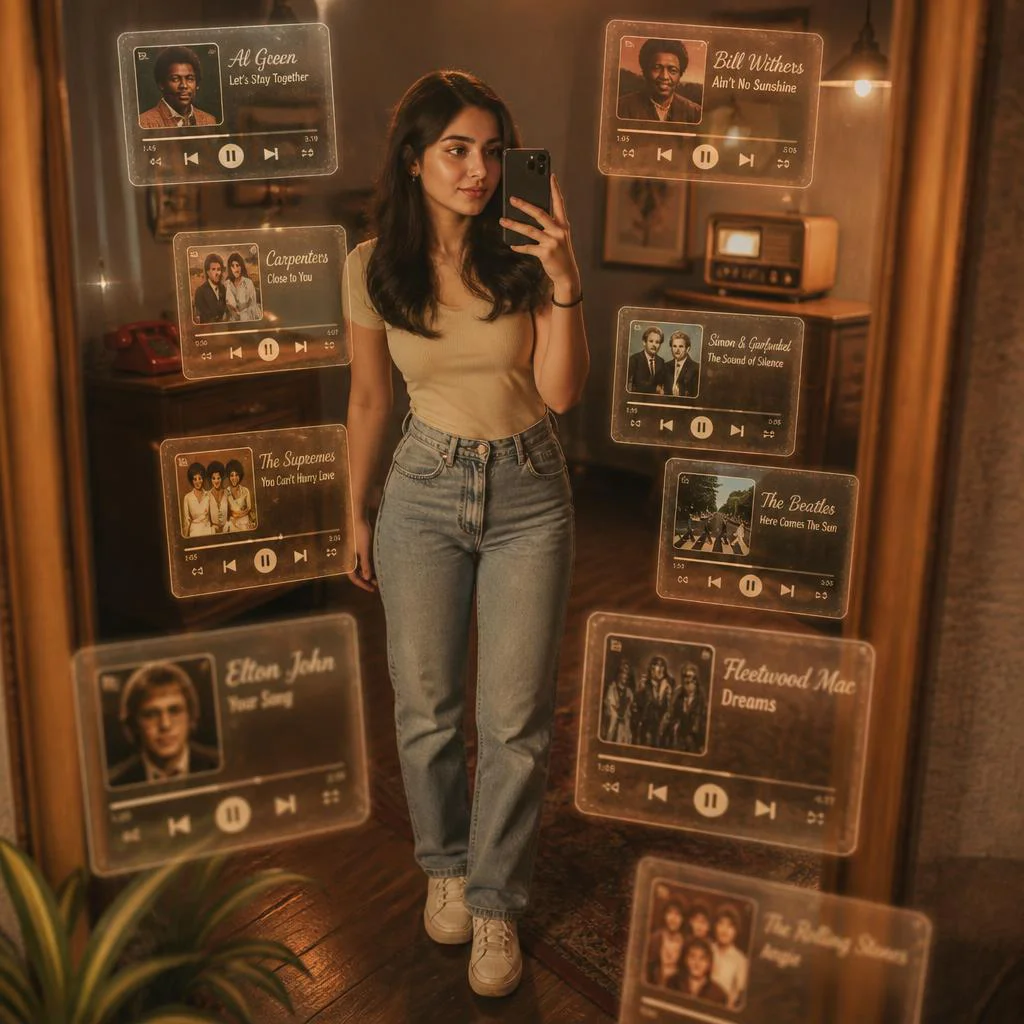
Vintage-Inspired Mirror Selfie with Retro Music Cards | Realistic Cinematic Mirror
A mirror selfie can be more than a simple reflection; it can become a portal to another era. This prompt transforms your own photo into a richly detailed, cinematic scene where nostalgia and technology blend seamlessly, surrounding you with floating, translucent music cards that glow with the warmth of a bygone age.
The concept pulls from vintage album art, antique radios, and the tactile charm of old-school interfaces. By keeping your exact likeness—face, hairstyle, and outfit—the final image feels deeply personal while the sepia-toned room and floating glass tiles build a dreamy, retro playlist atmosphere that tells a story without words.
What this vintage mirror selfie prompt is asking for
This prompt instructs the AI to use an uploaded reference photo as the anchor, preserving the subject's identity and clothing, and then places them inside a warm, vintage interior. The scene is a mirror selfie, meaning the subject holds a camera or phone while their reflection appears in an ornate mirror, and the space around them fills with layered, floating music player cards that evoke a nostalgic, retro playlist.
- The uploaded photo's exact face, hairstyle, body shape, and outfit are kept unchanged.
- A vintage-inspired room with sepia-toned lighting and classic furniture provides the backdrop.
- Multiple floating transparent 3D music player tiles surround the subject in depth.
- Each tile has an aged, frosted glass look with warm amber and faded brown edges.
- Tiles display vintage album art, classic button-style play controls, and analog progress bars.
- Old-school font song titles and antique radio UI elements appear on every card.
Setting the scene with floating retro music cards
Imagine stepping into a room where time has softened every edge. The prompt calls for "warm, sepia-toned lighting and classic furniture," creating an atmosphere thick with nostalgia. You stand before a mirror, phone in hand, capturing a moment that feels both staged and spontaneous, while the air around you shimmers with translucent, glowing tiles.
These aren't ordinary cards; the prompt describes them as having "an aged, frosted glass look, glowing softly with warm amber and faded brown edges." They float at different depths, each carrying "vintage album art, classic button-style play controls, analog-style progress bars, old-school font song titles, and antique radio UI elements." The overall effect is a cinematic blend of personal portrait and interactive music history.
Why this cinematic retro effect works
This prompt succeeds because it marries personal identity with a universally appealing aesthetic. The mirror selfie format feels intimate and modern, while the vintage music cards add layers of storytelling and visual texture. The result is an image that looks like a still from a film about memory and music, one that invites the viewer to lean in and explore every detail.
- The contrast between a sharp, realistic subject and soft, floating glass cards creates visual depth and a dreamlike quality.
- Retro UI elements like analog progress bars and old-school fonts trigger nostalgia, making the image emotionally resonant.
- Sepia lighting and classic furniture unify the scene, ensuring the final picture reads as a cohesive cinematic frame.
Three visual styles that stay inside this prompt
The beauty of this prompt is its built-in aesthetic range, and you can guide the output by emphasizing one of three distinct styles without changing the core description. Each style remains fully within the prompt's vintage music card and mirror selfie framework.
- Warm Nostalgic Film: Push the sepia tones and soft glow of the floating music cards to mimic an old photograph, making every tile feel like a memory pulled from a dusty record sleeve.
- Sleek Retro-Futurism: Sharpen the transparency and glass edges of the tiles while keeping the antique UI elements, creating a polished, almost holographic look that bridges past and future.
- Moody Cinematic Noir: Deepen the shadows in the vintage room and let the amber light from the cards cut through the darkness, giving the mirror selfie a dramatic, film-still intensity.
How to generate this mirror selfie step by step
Creating this image is a straightforward process that relies on a clear reference photo and careful prompt execution. Follow these steps to get a result where your likeness stays intact and the floating retro music cards feel integrated into the vintage room.
- Prepare your reference photo. Choose a clear, well-lit image of yourself where your face, hairstyle, and outfit are visible. Avoid heavy filters or extreme angles.
- Copy the full prompt. Take the complete prompt text and paste it into your AI image generator's prompt field without altering the structure or key phrases.
- Upload your photo as the main subject. Use the tool's image upload or reference feature to attach your photo, ensuring the prompt instructs the AI to keep your exact face, hairstyle, body shape, and outfit.
- Generate the initial output. Run the generation and review the result. Look for the mirror reflection, the vintage room setting, and the presence of floating glass music tiles.
- Check hands, face, and the mirror. Inspect your hands holding the phone, your facial features, and the reflection in the mirror. Any distortions here need a re-roll or slight prompt adjustment.
- Refine the music cards. Ensure the tiles show vintage album art, classic play controls, and old-school fonts. If they appear too modern or blurry, regenerate with emphasis on 'aged, frosted glass look' and 'antique radio UI elements.'
Choosing the right reference photo
The reference photo is the foundation of this entire image, and it must work with the prompt's vintage mirror selfie concept. A strong upload ensures the AI can map your features accurately onto the scene while maintaining the nostalgic mood.
- Use a photo with even, warm lighting that can blend with the sepia-toned room; harsh flash or cool daylight will fight the vintage atmosphere.
- Your outfit in the photo should complement the classic furniture and retro music theme—think timeless pieces rather than modern sportswear or busy patterns.
- Make sure your face and hands are unobstructed, since the mirror selfie pose requires a visible phone-holding hand and a clear reflection.
AI tools for generating this vintage music card scene
Different AI image generators handle reference photos and complex scene descriptions with varying levels of realism. The table below compares four popular tools and how they can be used to create this specific mirror selfie with floating retro music cards.
| Tool | Access | Typical realism | Useful here for |
|---|---|---|---|
| ChatGPT | DALL·E integration, web and mobile | High, with strong prompt adherence | Preserving your exact face while rendering the aged, frosted glass look of the music tiles |
| Google Gemini | Gemini app and web, Imagen integration | High, good at lighting and texture | Capturing the sepia-toned lighting and classic furniture with cinematic depth |
| Leonardo AI | Web platform, free and paid tiers | Very high, excels at style consistency | Generating the transparent 3D music player cards with vintage album art and analog progress bars |
| Midjourney | Discord, subscription-based | Exceptional, cinematic quality | Creating the overall nostalgic, retro playlist effect with floating glass tiles and antique radio UI elements |
Three tips for better floating music card results
Small adjustments can make a big difference in how the vintage music cards and mirror selfie come together. These tips focus on real materials and objects mentioned in the prompt to help you refine the output.
- If the frosted glass tiles look too solid, add weight to 'transparent 3D' in your prompt variations to emphasize the see-through quality of each card.
- When the vintage album art appears generic, describe a specific era or color palette in a follow-up prompt, such as '1970s jazz album covers with muted oranges and browns.'
- To make the classic button-style play controls and analog progress bars pop, request higher contrast between the warm amber glow and the faded brown edges of the cards.
Common issues and what to change
Even with a detailed prompt, certain failures can occur when generating this mirror selfie. The table below lists four specific problems and the exact changes to make in your prompt or settings to fix them.
| Issue | What to change |
|---|---|
| Your face doesn't match the reference photo | Re-upload the photo and ensure the prompt phrase 'Keep my exact face, hairstyle, body shape, and outfit' is placed near the beginning. |
| The music cards appear flat instead of floating in depth | Add 'arranged in a 3D sphere around the subject with varying depths and sizes' to reinforce the spatial layering. |
| The room looks modern instead of vintage | Strengthen the description to 'antique wooden furniture, an ornate gilded mirror, and heavy velvet drapes in sepia light.' |
| The tiles lack visible UI elements like play controls | Specify 'each card must clearly show classic triangular play buttons, a circular volume knob, and a horizontal analog progress bar.' |
Frequently Asked Questions
Can I use a group photo instead of a solo selfie for this prompt?
The prompt is designed for a single subject taking a mirror selfie. If you upload a group photo, the AI may struggle to isolate one person and could place multiple reflections in the mirror, breaking the cinematic composition.
Will the vintage album art on the cards be real album covers?
AI-generated images typically create original, fictional album art that mimics the style of vintage records. You won't see copyrighted covers, but the aesthetic will match the prompt's description of retro, aged designs with old-school fonts.
How do I make the floating cards look more like glass and less like paper?
Emphasize the 'frosted glass look' and 'transparent 3D' terms in your prompt. You can also add phrases like 'light passing through each tile' or 'subtle reflections on the glass surface' to enhance the material quality.
Conclusion
This prompt turns a simple mirror selfie into a rich, cinematic narrative where vintage music culture floats around you in delicate glass cards. The combination of personal identity, sepia-toned nostalgia, and interactive retro UI elements creates an image that feels both deeply personal and universally evocative, perfect for anyone looking to blend portrait photography with a love for classic music aesthetics.
Remember to use a reference photo you have full rights to edit and transform, ensuring your creative work remains entirely your own.


